Methodology Work Services Book About Writing Make Me Think - chapters Methods Guide Notes Blog FAQ

Work / 05

05Own product

Cognograph

Spatial AI canvas · web app and desktop builds · source on GitHub under AGPL-3.0

Context engineering for people who think visually. Instead of writing it into files and commands, you arrange it on a canvas: what you connect, and how, is what the AI reads.

My own product · designed and directed solo · January 2026 to now
Today’s captures taken 2026-10-06; earlier images are dated in their captions.

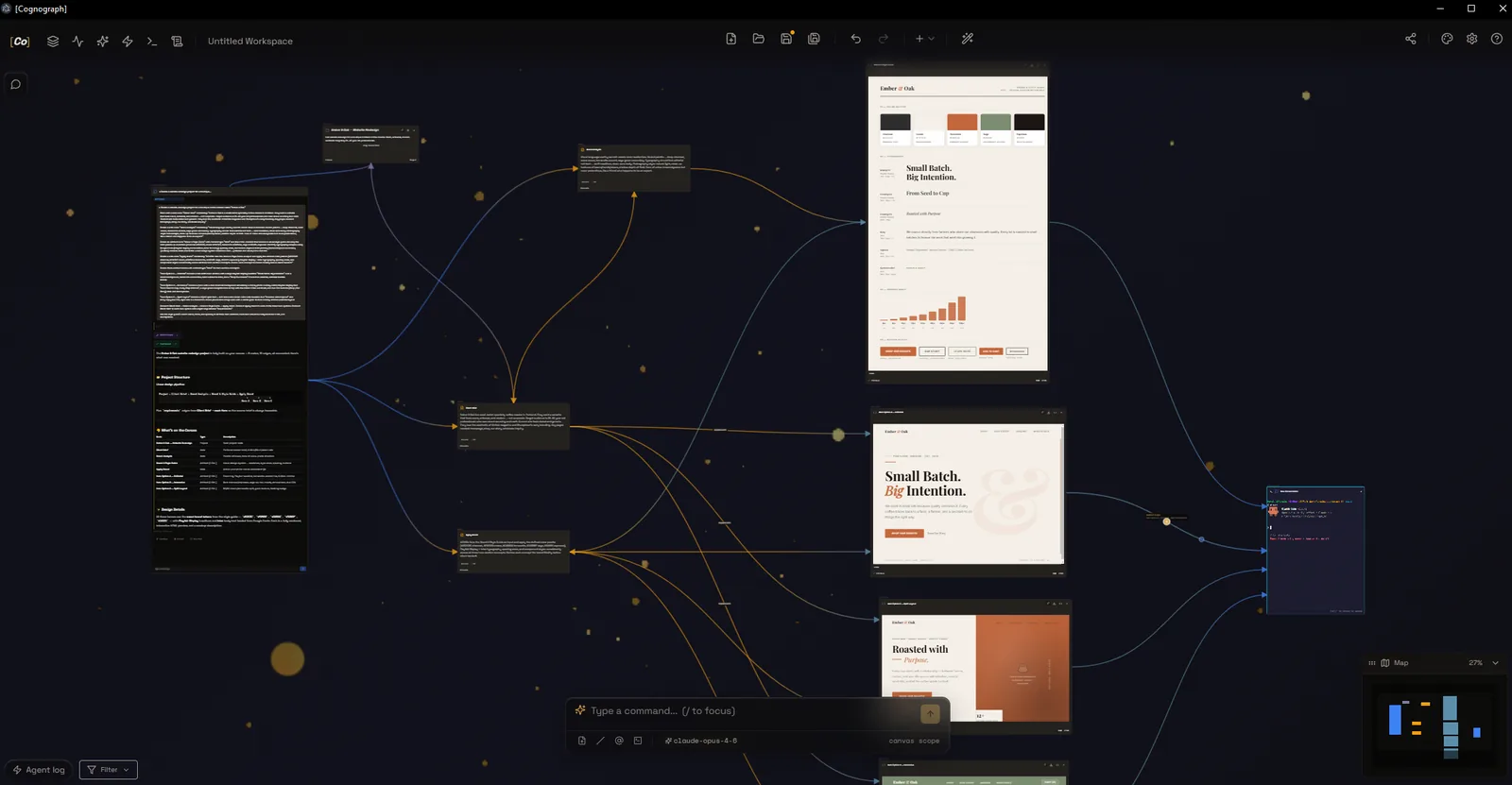
A Cognograph workspace: conversation and note nodes on the left, joined by context edges to the brand style guide pages they generated on the right.

Cognograph in use, from the product’s own screenshot gallery, April 2026: brand style guide artifacts joined by context edges to the conversation nodes that made them.

Opens the canvas at cognograph.app/workspace: free, in the browser, no account needed.

At a glance

Why
I was running two to six Claude Code sessions at once and carrying the context between them by hand.
For
People who think visually and work with AI, starting with me: they would rather arrange their context on a canvas than manage it at a command line.
Role
Designed and directed solo. Claude wrote most of the code against my specs; I reviewed and tested what came back.
Built
First prototype 2026-01-07. Web version live 2026-02-27.
Shipped
The web app at cognograph.app/workspace, which runs a newer build than the public source. The source is on GitHub under AGPL-3.0, with unsigned desktop builds for Windows, macOS and Linux (v0.3.0, May 2026).
Status
Free web demo live, no account needed.
Patents
Four US provisional applications, filed February 2026: 63/979,198, 63/979,201, 63/979,203 and 63/979,205.
Stack
React and TypeScript, Electron, React Flow, Three.js. My part: architect, direct, specify, verify.

What the design aimed for

Pre-verbal arousal: the nervous system registering trust, relevance, and forward momentum before the analytical mind engages.

For Cognograph: someone who thinks visually registers “I can see what the AI sees” on the first look at the canvas.

Checkpoint 01 · First visit

“Is this another AI chat, or something new?”

A first-time visitor has used AI chat before. They give the first screen a few seconds to show what is different here, and whether it fits the way they think.

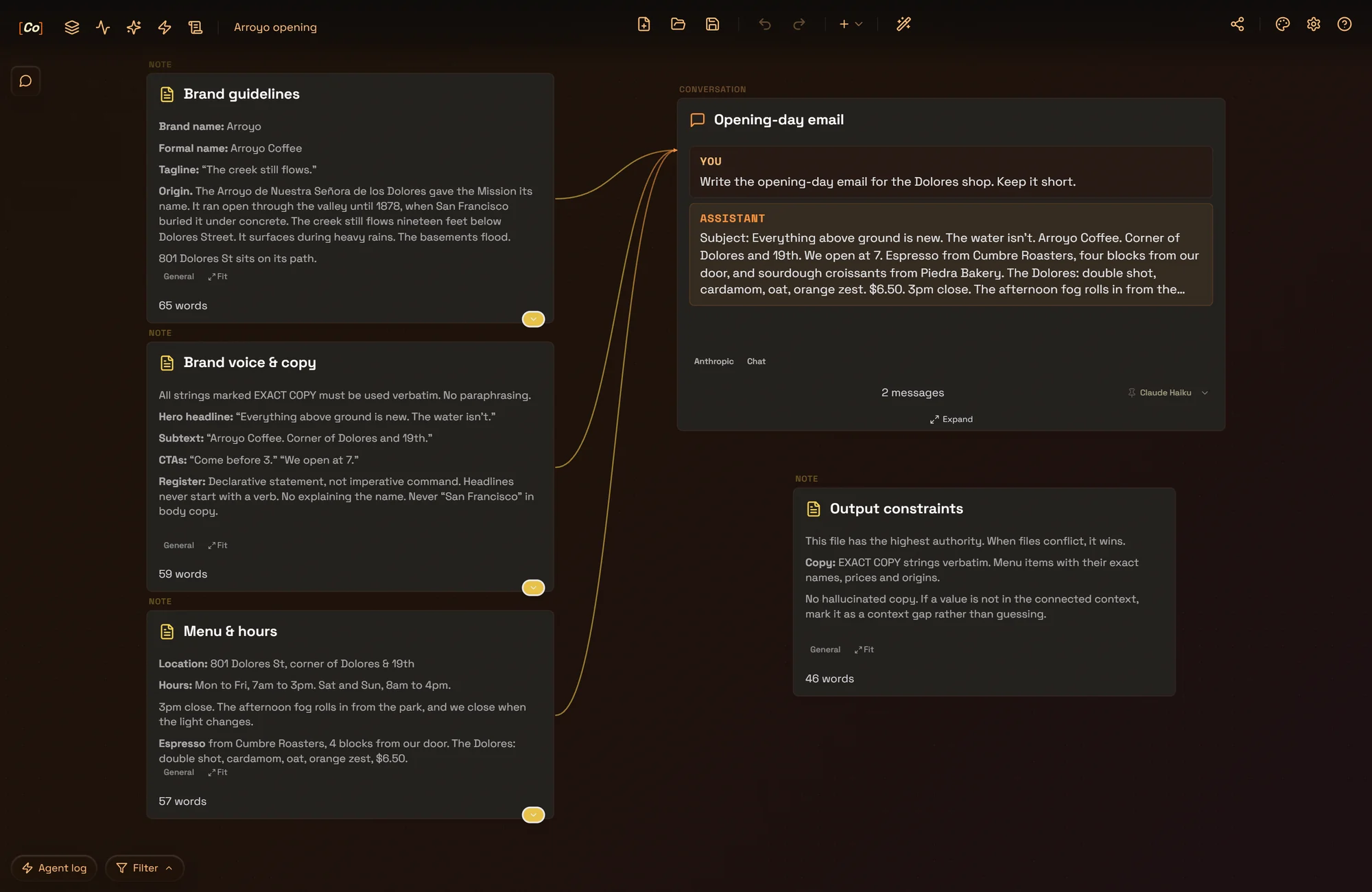
A Cognograph canvas. On the left, three notes, Brand guidelines, Brand voice & copy, and Menu & hours, each holding its rules and facts, are wired by amber lines into a conversation, Opening-day email. In it, You: Write the opening-day email for the Dolores shop. Keep it short. Assistant: Subject: Everything above ground is new. The water isn’t. Arroyo Coffee. Corner of Dolores and 19th. We open at 7, and the email goes on with the roaster, the bakery, The Dolores and the 3pm close. Below on the right, the note Output constraints sits on its own, with no line to it. Gold markers 1 and 2 point at the answer and at the unwired note.
The canvasA Cognograph canvas: three notes wired into a conversation that drafts the opening-day email, and a fourth left unwired.

Decisions

1

The arrangement is the context

L1 First-Impression Architecture

Clear the fifty-millisecond trust gate so attention switches on at all.

L2 Processing Fluency

Make the page easy to read so the content feels true.

The notes wired into a conversation are what the AI reads: the app walks the edges from the node you talk to. Here the email takes its headline, its opening line and its hours word for word from the three wired notes; the fourth, unwired, stays out.
2

For people who would rather see it

L3 Perception Bias Optimization

Design for what the reader actually does, not what they would say they want in a focus group.

In a terminal the context lives in files and commands you keep in your head. Here it sits on the canvas, where someone who thinks visually can check it at a glance and change it by moving a line.

What it was built to change

A visitor sees what the AI reads in the same glance that shows them the canvas, and can wire up the same in the free demo.

Paste-ready line

My bet: the next interface problem in AI is the context, not the chat.

Checkpoint 02 · First session

“Can I see what the AI will see?”

Before the first send, the user wants to know what the AI will read. When an AI gathers its context out of sight, the natural response is distrust.

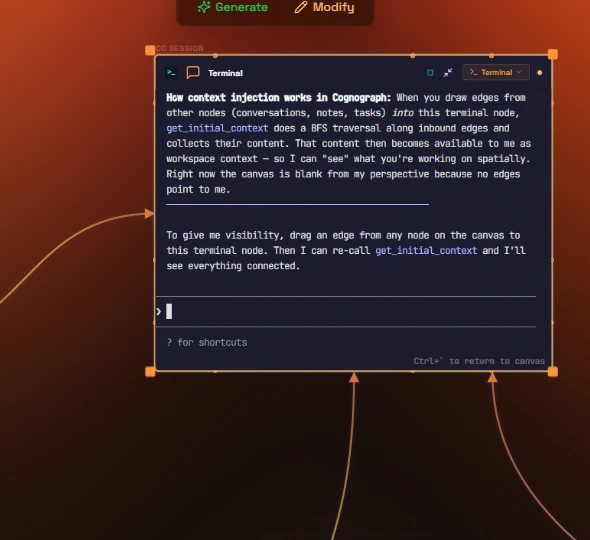
A Claude Code session in a Cognograph terminal node, in the desktop app's amber theme. Its text reads: How context injection works in Cognograph: When you draw edges from other nodes (conversations, notes, tasks) into this terminal node, get_initial_context does a BFS traversal along inbound edges and collects their content. Edges run into the node from the left and from below. Gold markers 1 and 2 point at an edge and at the session's answer.
On the canvasThe desktop app, from the product's screenshot gallery, April 2026: a Claude Code session in a terminal node, with edges drawn into it, says how it gets its context.
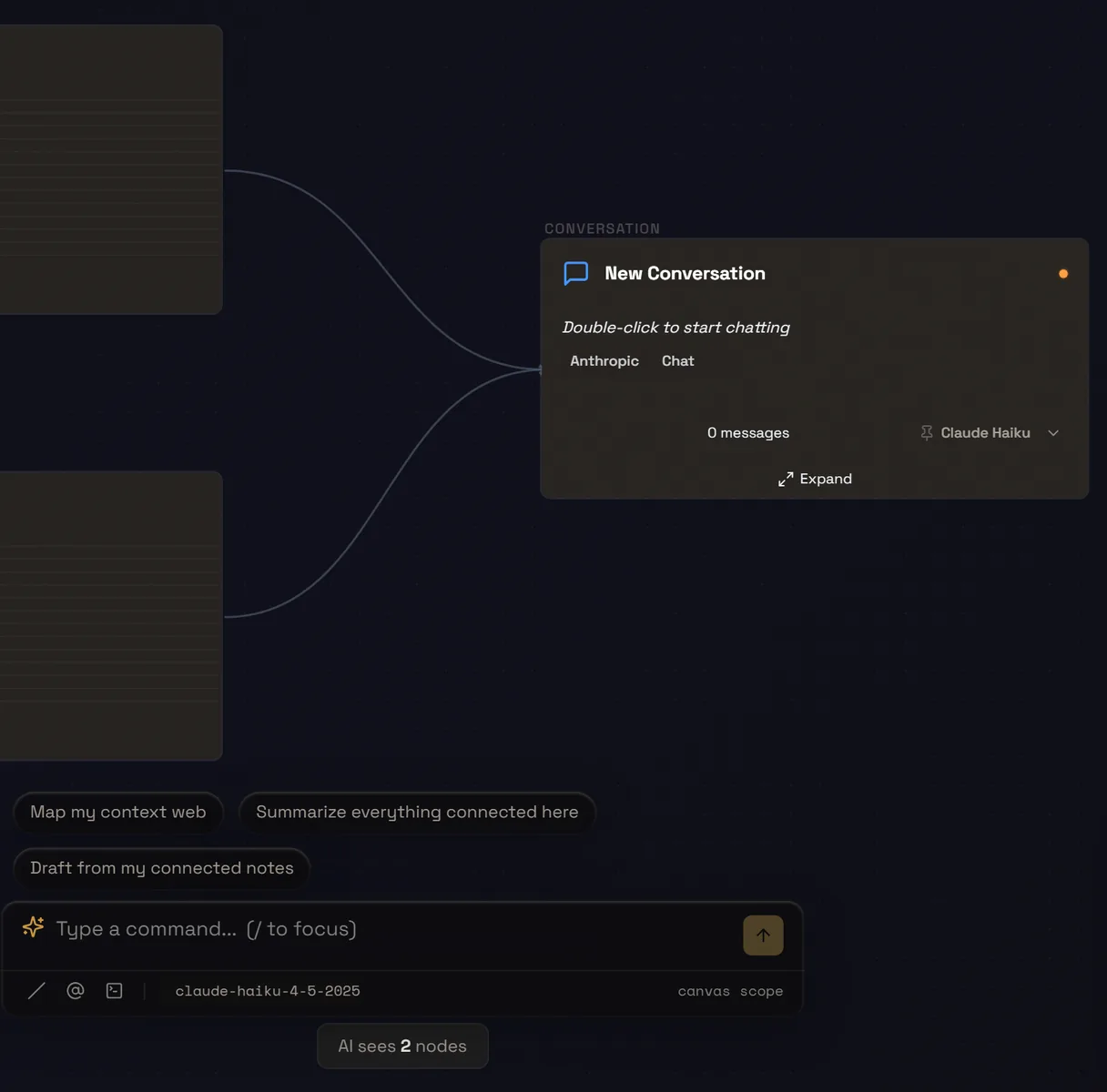
The Cognograph web app on 2026-10-06: edges from two notes, cut off at the left, lead into a New Conversation node; under the command bar a badge reads AI sees 2 nodes. Gold marker 3 points at the badge.
Before the sendThe web app today, captured 2026-10-06: two default notes connected to a conversation, opened with Open Chat from its menu. Under the command bar, the badge reads “AI sees 2 nodes”.

Decisions

1

The connections are the context

Since January, connected nodes feed the prompt: the app walks the edges from the node you talk to and gathers what they reach. You connect things instead of writing a system prompt.

2

Claude Code starts from the same connections

In the desktop app a conversation node can run Claude Code in a terminal, and it starts from the same connections: what is wired into it is handed over first. Asked how it gets its context, the session here answers in its own words.

3

Show what it will read, before the send

L4 Decision Architecture

Structure the page so the right action is the easiest action.

In February I wrote down the rule this follows: when an AI gathers context out of sight, show the mechanism before the send, not an explanation after the answer. The badge counts the nodes the AI will read.

Checkpoint 03 · Shaping the context

“Can I tell it how to use each piece?”

Connecting a note decides that the AI reads it. The next question is how: as a rule to follow, an example to copy or background to keep in mind, and what to drop first when the token budget runs short.

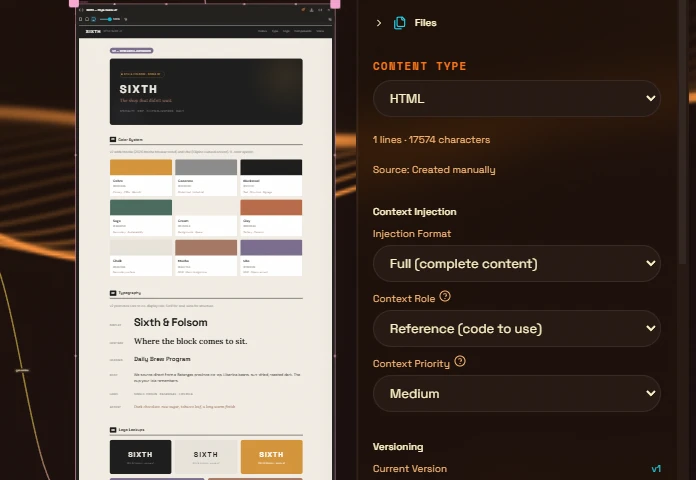
A selected style guide artifact on the Cognograph canvas, beside its properties panel: Content Type HTML, then Context Injection with Injection Format Full (complete content), Context Role Reference (code to use) and Context Priority Medium. Gold markers 1 and 2 point at the role and the priority.
On the canvasThe desktop app, from the product's screenshot gallery, April 2026: a style guide artifact selected, and its context settings in the panel beside it.

Decisions

1

Each node says how it should be read

Every note and artifact carries a context role: reference to use, an example to follow, an instruction to obey, or background. In a terminal I pasted the brand guidelines into each session by hand; here the role is a setting on the node.

2

What goes first when the budget runs short

A priority decides what goes in first when the token budget is tight, and a format decides how much of a node to send: all of it, a summary, in pages, or only its title.

Checkpoint 04 · Trust

“Which model will answer, and why that one?”

Before trusting an answer, the user needs to know which model will give it and where that choice came from: their own pick, a workspace default, or Auto.

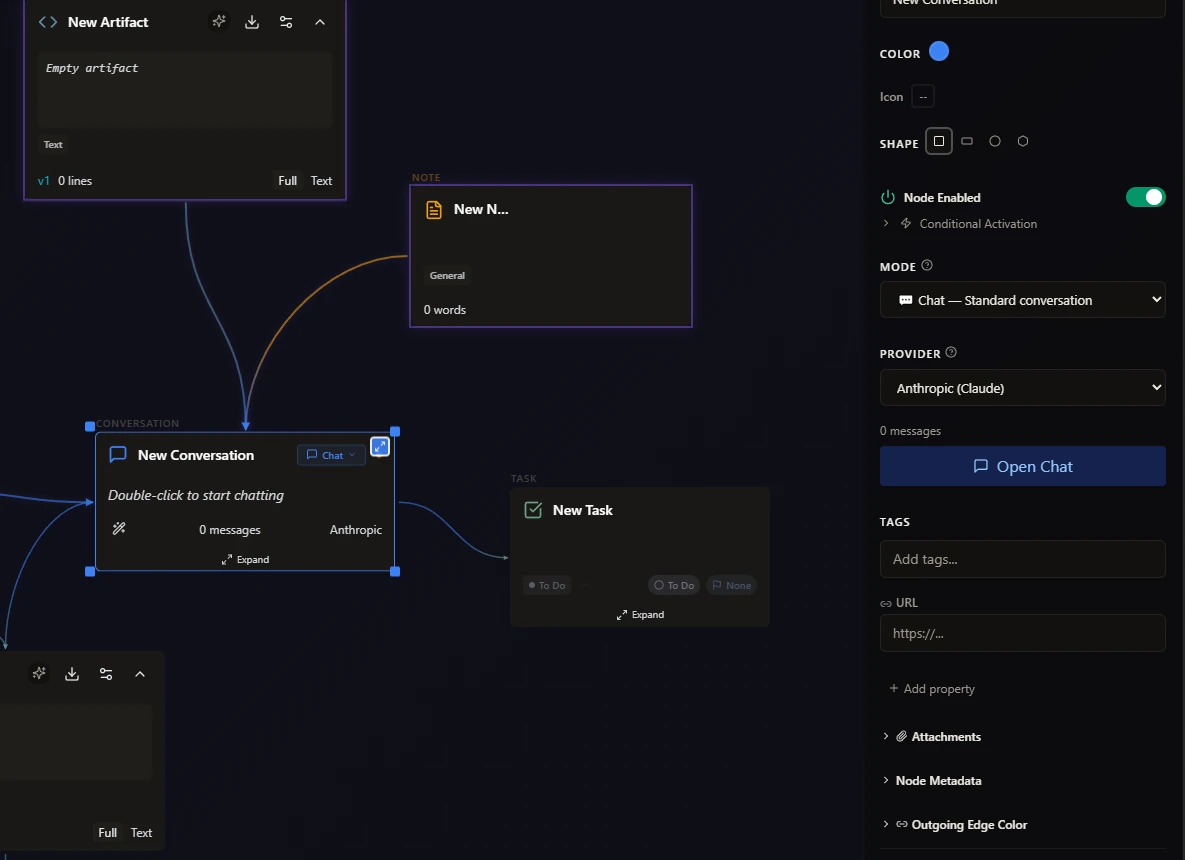
Cognograph in March 2026: a canvas of new nodes (an artifact, a note, two conversations, a task) with a selected New Conversation node showing Anthropic and 0 messages, and its properties panel with the mode Chat, Standard conversation and the provider Anthropic (Claude).
BeforeMarch 2026, from my build log: the conversation and its properties named the provider, Anthropic, not the model.
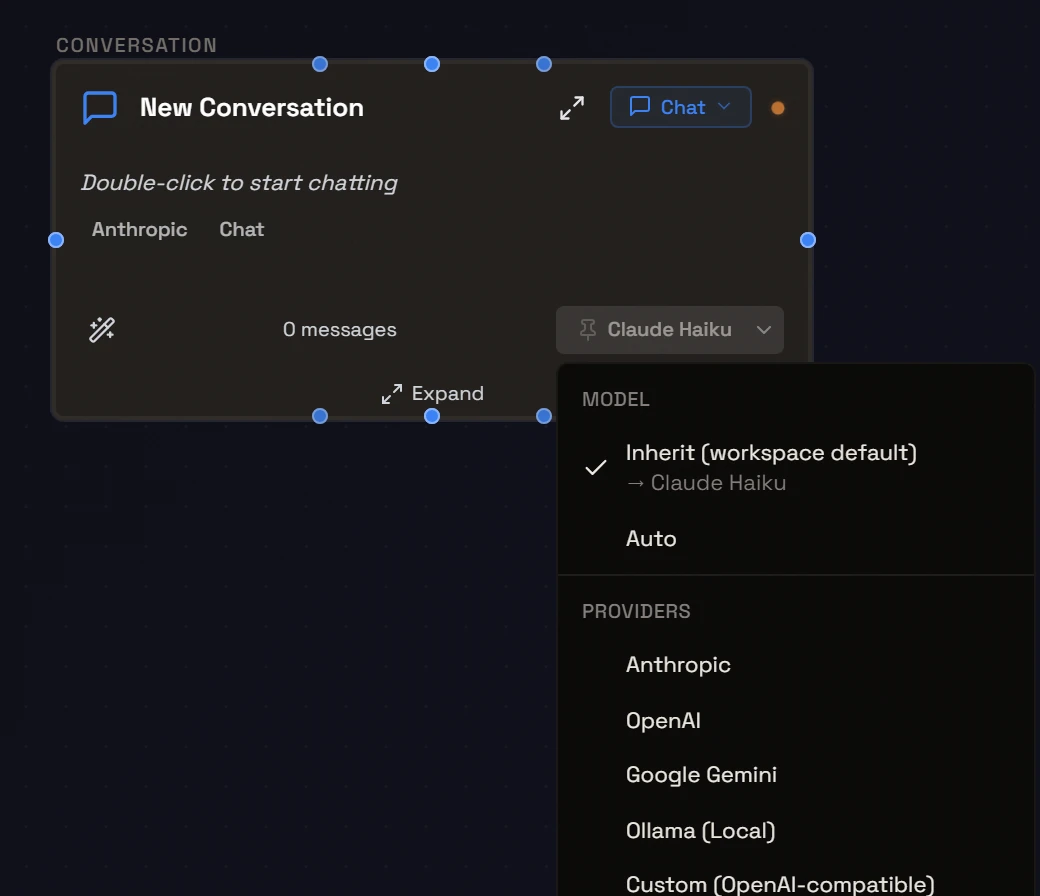
The Cognograph web app on 2026-10-06: a New Conversation node with its model menu open: Model, Inherit (workspace default) with Claude Haiku under it, checked, and Auto; then Providers: Anthropic, OpenAI, Google Gemini, Ollama (Local), Custom (OpenAI-compatible). Gold markers 1 and 2 point at the model choices and at the providers.
AfterThe web app today, captured 2026-10-06: a new conversation's model menu, open. These controls date from June 2026 and are not in the public source yet.

Decisions

1

Every setting says where it comes from

A conversation can follow the workspace default, pin its own model, or leave the choice to Auto, and the menu says which it follows and what that resolves to. My first version was an on and off switch: touching it turned the node into a permanent override, so later changes to the default never reached it.

2

Any provider, chosen per conversation

Each conversation can run on Anthropic, OpenAI, Google Gemini, a local model through Ollama, or any OpenAI-compatible endpoint, set on the node rather than for the whole app.

What the AI does, what the design does

The model writes. The canvas decides what it reads.

The model

  • Answers inside a conversation node, as a chat or as an agent that takes steps.
  • Runs as Claude Code in a terminal node, in the desktop app.
  • Writes the HTML that artifact nodes render on the canvas.
  • Proposes changes to the canvas when you ask for them.

The design

  • Decides what the model reads: the edges. The app walks the graph from the node you talk to.
  • Shows that before you send, with a count of the nodes the AI will read.
  • Holds proposed changes as ghost nodes until you apply them.
  • Says which model will answer and why, and records the one that did.

When it is wrong

In June, a PFD evaluate pass on my own routing design caught a trust bug before it reached users: after an outage fallback, the model chip would have shown the model that was planned, not the one that answered. I fixed that first. Each message now records the model it ran on, and the chip reads that record.

What I changed my mind about

  1. Artboard mode. I added it in March for expanded node editing and removed it in April: 6,500 lines of glassmorphic overlay that didn’t earn its complexity.
  2. The headline. In April five different hero messages were live at once, on the homepage, in the README, the meta description and two llms.txt files; on 2026-04-09 I chose one hook for all of them.
  3. Who it is for. On 2026-02-28 I narrowed it from a general AI canvas to web design; in April, to people who code with AI. Today’s answer is in the panel at the top.

The method

Five layers, with the limits and the research behind eachShow all +Hide
  1. L0 Cognitive Load

    Free the working memory the reader needs to process the page at all.

  2. L1 First-Impression Architecture

    Clear the fifty-millisecond trust gate so attention switches on at all.

  3. L2 Processing Fluency

    Make the page easy to read so the content feels true.

  4. L3 Perception Bias Optimization

    Design for what the reader actually does, not what they would say they want in a focus group.

  5. L4 Decision Architecture

    Structure the page so the right action is the easiest action.

The framework, with its research and its limits

Result

The free web demo is live, no account needed.

Perception-First Design™ consulting

For branding, brand development and marketing strategy.

Stefan Kovalik   San Francisco

Send me your site.

I’ll tell you what I’d change. No pitch, just an honest read. If it makes sense to work together, we will.

Weekday response within 48 hours.

I have room right now.